Complete Withdrawal Guide
The B9 Game Withdraw process allows eligible users to request funds from their gaming balance to an external payment method. Current B9 withdrawal information mentions options such as JazzCash, Easypaisa, and bank accounts. The exact methods, limits, verification requirements, and processing times can vary by service.
Before submitting a withdrawal, check the amount shown as withdrawable rather than assuming that every balance displayed in the account can immediately be transferred.
What Is a Withdrawable Balance?
The current B9 withdrawal page separates Cash Balance and Withdrawable amounts. This distinction is important because deposited funds, promotional funds, wagering requirements, and other account conditions can affect the amount available for withdrawal.
Always check the withdrawal screen before submitting a request.
B9 Game Withdrawal Methods
Current B9 information lists several payment options:
| Method | Availability |
|---|---|
| JazzCash | Available on current withdrawal page |
| Easypaisa | Available on current withdrawal page |
| Bank | Available on current withdrawal page |
| Other methods | May vary by service |
The current B9 withdrawal page asks users to select or add a receiving account before requesting the withdrawal.
How to Withdraw From B9 Game
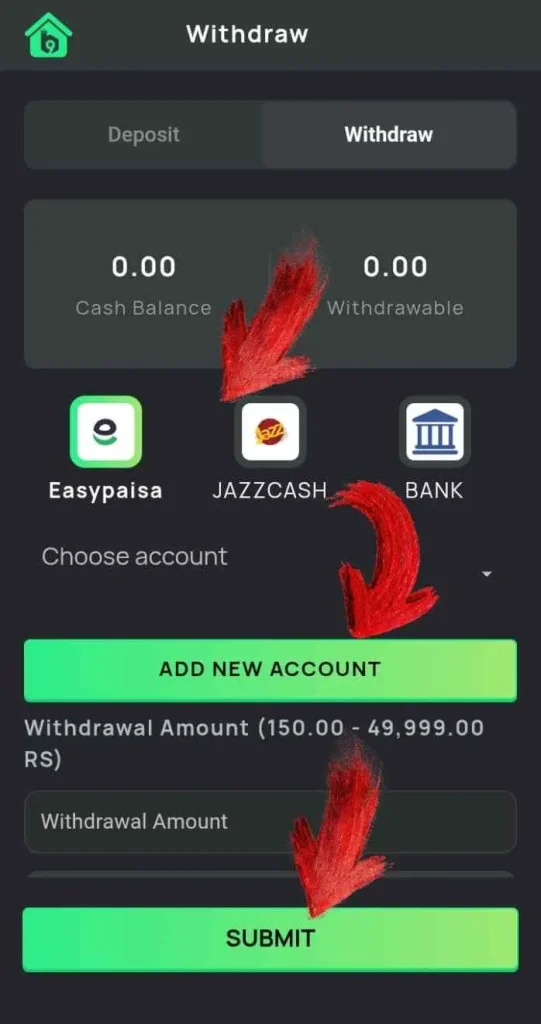
The general process is:
- Log in to your B9 Game account.
- Open the Wallet section.
- Select Withdraw.
- Check your withdrawable balance.
- Choose JazzCash, Easypaisa, Bank, or another available method.
- Select an existing receiving account or add a new one.
- Enter the withdrawal amount.
- Check the receiving details.
- Review any displayed fee or requirements.
- Submit the request.
- Check the transaction history for the status.
The current B9 withdrawal guide follows this wallet-to-payment-method process and asks users to enter the amount after selecting the receiving account.
Add Your Payment Account Carefully
When adding a JazzCash, Easypaisa, or bank account, enter the details accurately.
Depending on the method, you may need information such as:
- Wallet number
- Account-holder name
- Bank account details
- IBAN
- Other verification information
A small mistake can cause a transaction to fail or require additional verification.
Where the platform requires payment details to match the account holder, use your own payment account.
Withdrawal Limits and Processing
Withdrawal limits are not necessarily the same across every B9-branded service.
The current B9 withdrawal page lists a PKR 50,000 daily wallet receiving limit and a PKR 500,000 daily bank-card limit for its described service. These figures should be treated as current page information rather than universal B9 rules because other B9 platforms can have different limits.
Always check the limits displayed in your own withdrawal screen before submitting a request.
Why Can a Withdrawal Be Delayed?
A withdrawal can take longer because of:
- Incorrect payment details
- Account verification
- Payment-provider processing
- Insufficient withdrawable balance
- Promotional or wagering conditions
- Technical problems
- Security checks
If a withdrawal is pending, check the transaction status before creating another request.
What If a Withdrawal Fails?
First check the reason displayed by the platform. Make sure the payment account information is correct and that your account has completed any required verification.
If the issue continues, contact the official support channel and provide the transaction reference where available.
Never give your password or OTP to someone who claims they can manually release a withdrawal.
Withdrawal Safety Tips
For safer transactions:
- Use your own payment account.
- Double-check wallet and bank details.
- Keep transaction receipts.
- Check withdrawal conditions before submitting.
- Never pay an unknown person to “unlock” a withdrawal.
- Do not share passwords or OTPs.
- Check the exact B9 website you are using.
Real-money gaming involves financial risk, and a withdrawal represents eligible funds subject to the platform’s current rules. It should not be viewed as guaranteed income.
Frequently Asked Questions
Which methods can I use to withdraw?
The current B9 withdrawal page lists JazzCash, Easypaisa, and Bank options.
Why is my withdrawable amount lower than my balance?
Different types of funds can be subject to different conditions. Check the amount specifically labelled Withdrawable.
Can I withdraw to someone else’s account?
This depends on the platform’s rules. Using your own verified payment account is generally the safer approach.
How long does a withdrawal take?
Processing time can vary according to the payment method, verification status, and platform processing.
Final Thoughts
The B9 Game Withdraw process is completed through the wallet section by selecting a supported payment method, choosing a receiving account, entering an eligible amount, and submitting the request. Current B9 information lists JazzCash, Easypaisa, and bank options, but limits and conditions can change.
Before making a withdrawal, verify your account details and review the current requirements displayed on the platform. Keeping your transaction information and protecting your account credentials can also help avoid unnecessary problems.