Complete Sign In and Password Recovery Guide
The B9 Game Login process is used by existing users to access their account. The current login page asks for the registered Pakistani mobile number and account password. It also provides a password recovery option for users who cannot remember their credentials.
Once logged in, users can access account features such as games, wallet functions, promotions, profile settings, deposits, withdrawals, and account history, depending on the service.
How to Login to B9 Game
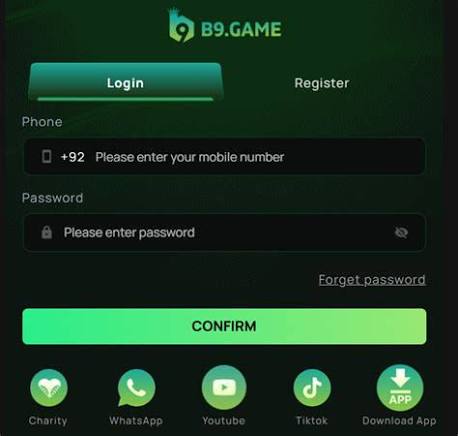
Follow these simple steps:
- Open the B9 Game application or website.
- Select Login.
- Enter the mobile number connected to your account.
- Enter your account password.
- Check the details carefully.
- Tap Confirm.
- Wait for the account dashboard to load.
The current login interface uses the +92 Pakistani country code before the mobile-number field.
Enter Your Number Correctly
Many login errors happen because users enter a different number from the one used during registration.
Check the following:
- Use your registered mobile number.
- Do not enter +92 twice.
- Check every digit.
- Remove accidental spaces.
- Do not use a new number unless it has been properly linked to your account.
Changing your physical phone does not necessarily mean you need a new account. You can normally use the same account credentials on another supported device.
Check Your Password
Passwords are case-sensitive. For example, uppercase and lowercase letters are treated differently.
If your password is not being accepted, carefully type it again instead of relying on an old saved password.
Also remember that your B9 Game account password is different from a payment PIN, banking password, or OTP. Never enter financial-account credentials into a gaming login form.
Forgot B9 Game Password?
The current B9 login page provides a Forget Password option. The recovery interface offers phone and email routes.
Phone Recovery
The phone recovery option uses the registered mobile number and verification information. An OTP can be sent to the registered phone during the recovery process.
Email Recovery
The email recovery option can be used when a registered email address is available. The recovery process may ask for both the registered phone number and email along with verification information.
After completing the verification process, follow the instructions to create a new password.
Common B9 Login Problems
| Problem | Possible Solution |
|---|---|
| Wrong password | Re-enter the current password |
| Wrong number | Use the number connected to the account |
| +92 twice | Remove the extra country code |
| Forgotten password | Use Forget Password |
| Poor internet | Check your connection |
| Old saved password | Delete and enter the current password |
| Account recovery issue | Use official support |
If login continues to fail after checking the details, account recovery is usually better than repeatedly guessing the password.
Account Security Tips
Keep your login information private. Never share your password, OTP, or recovery code with someone who claims to be an agent or support representative.
Use a unique password and avoid logging in through suspicious links received through social media or messaging apps.
Before entering credentials, check the website address carefully. Similar-looking websites can create confusion when several services use the same or similar branding.
Login on a New Phone
If you buy a new phone, you generally do not need to create another account simply because your device has changed.
Install the appropriate application, open the Login page, and use the credentials connected to your existing account.
If you have lost access to your registered phone number, account recovery can become more complicated because verification codes may be sent to the registered contact.
Frequently Asked Questions
How do I log in?
Enter your registered Pakistani mobile number and account password on the B9 Game Login page.
What if I forgot my password?
Use the Forget Password option and follow the phone or email recovery process.
Can I log in from another phone?
You can generally use the same account credentials on another supported device.
Should I share my OTP?
No. OTPs and passwords should remain private.
Final Thoughts
The B9 Game Login process is straightforward when you have the correct registered mobile number and password. If you forget your credentials, use the platform’s recovery options instead of creating another account.
For better security, always verify the login page, protect your password and OTP, and avoid entering account information into unknown websites.